각 포스트마다 개성 있는 비주얼로 만들고 싶었는데, 특히 썸네일 이미지와 자연스럽게 어우러지는 배너가 있다면 더 나은 사용자 경험을 제공할 수 있을 것 같았다. 그래서 썸네일 이미지에서 색상을 추출해 동적으로 그라디언트 배너를 생성하는 시스템을 구현해보았다.
구현 목표
→ 정적인 배너 대신 각 포스트의 썸네일과 조화를 이루는 동적 배너 만들기
주요 아이디어는 다음과 같다.
- 썸네일 이미지에서 주요 색상 추출
- 추출된 색상으로 팔레트 생성
- 그라디언트 배너 렌더링
기술적 구현
1. CORS 문제 해결
웹에서 외부 이미지의 픽셀 데이터를 읽으려면 CORS를 우회해야 한다. 여러 프록시를 순차적으로 시도하는 방식으로 진행했다.
import { useEffect, useRef, useState } from "react";

// CORS 프록시 목록
const corsProxies = [
  "", // 원본 URL 먼저 시도
  "https://api.allorigins.win/raw?url=",
  "https://corsproxy.io/?",
  "https://cors-anywhere.herokuapp.com/",
];

interface ColorPalette {
  color1: string;
  color2: string;
  color3: string;
  color4: string;
}

export function useDynamicBanner(thumbnail: string | undefined) {
  const [gradientStyle, setGradientStyle] = useState<string>("");
  const [isLoading, setIsLoading] = useState(false);
  const gradientCache = useRef<Map<string, string>>(new Map());
  const currentThumbnail = useRef<string>("");

  useEffect(() => {
    if (!thumbnail) return;

    currentThumbnail.current = thumbnail;

    // 캐시 확인
    if (gradientCache.current.has(thumbnail)) {
      const cachedGradient = gradientCache.current.get(thumbnail)!;
      setGradientStyle(cachedGradient);
      return;
    }

    setIsLoading(true);
    extractColorsAndCreateGradient(thumbnail)
      .then((gradient) => {
        // 경쟁 상태 방지
        if (currentThumbnail.current === thumbnail) {
          setGradientStyle(gradient);
          gradientCache.current.set(thumbnail, gradient);
        }
      })
      .finally(() => {
        if (currentThumbnail.current === thumbnail) {
          setIsLoading(false);
        }
      });
  }, [thumbnail]);

  return { gradientStyle, isLoading };
}

// Canvas API를 사용한 색상 추출
async function extractColorsAndCreateGradient(imageSrc: string): Promise<string> {
  try {
    const img = await loadImageWithCORS(imageSrc);
    const colors = extractMainColors(img);
    const palette = generateColorPalette(colors[0]);

    return `linear-gradient(135deg,
      ${palette.color1} 0%,
      ${palette.color2} 25%,
      ${palette.color3} 75%,
      ${palette.color4} 100%)`;
  } catch (error) {
    console.error("색상 추출 실패:", error);
    return generateFallbackGradient();
  }
}

// CORS 프록시를 통한 이미지 로딩
async function loadImageWithCORS(imageSrc: string): Promise<HTMLImageElement> {
  for (const proxy of corsProxies) {
    try {
      const img = await loadImage(proxy + imageSrc);
      return img;
    } catch (error) {
      continue;
    }
  }
  throw new Error("모든 CORS 프록시 실패");
}

function loadImage(src: string): Promise<HTMLImageElement> {
  return new Promise((resolve, reject) => {
    const img = new Image();
    img.crossOrigin = "anonymous";

    const timeout = setTimeout(() => {
      reject(new Error("이미지 로딩 타임아웃"));
    }, 2000);

    img.onload = () => {
      clearTimeout(timeout);
      resolve(img);
    };

    img.onerror = () => {
      clearTimeout(timeout);
      reject(new Error("이미지 로딩 실패"));
    };

    img.src = src;
  });
}

// 이미지에서 주요 색상 추출
function extractMainColors(img: HTMLImageElement): string[] {
  const canvas = document.createElement("canvas");
  const ctx = canvas.getContext("2d", { willReadFrequently: true })!;

  // 성능을 위해 이미지 크기 축소
  const targetSize = 80;
  const scale = Math.min(targetSize / img.width, targetSize / img.height);
  canvas.width = Math.max(40, Math.floor(img.width * scale));
  canvas.height = Math.max(40, Math.floor(img.height * scale));

  ctx.drawImage(img, 0, 0, canvas.width, canvas.height);

  const imageData = ctx.getImageData(0, 0, canvas.width, canvas.height);
  const data = imageData.data;

  // 색상 히스토그램 생성
  const colorMap = new Map<string, number>();

  for (let i = 0; i < data.length; i += 4) {
    const r = data[i];
    const g = data[i + 1];
    const b = data[i + 2];
    const alpha = data[i + 3];

    // 투명 픽셀 제외
    if (alpha < 128) continue;

    // 극단적인 밝기 필터링
    const brightness = (r + g + b) / 3;
    if (brightness < 40 || brightness > 220) continue;

    // 색상 그룹화 (노이즈 감소)
    const rRounded = Math.round(r / 20) * 20;
    const gRounded = Math.round(g / 20) * 20;
    const bRounded = Math.round(b / 20) * 20;

    const colorKey = `${rRounded},${gRounded},${bRounded}`;
    colorMap.set(colorKey, (colorMap.get(colorKey) || 0) + 1);
  }

  // 빈도수 기준 정렬
  const sortedColors = Array.from(colorMap.entries())
    .sort((a, b) => b[1] - a[1])
    .slice(0, 5)
    .map(([color]) => color);

  return sortedColors.length > 0 ? sortedColors : ["128,128,128"];
}

// 색상 팔레트 생성
function generateColorPalette(baseColor: string): ColorPalette {
  const [r, g, b] = baseColor.split(",").map(Number);
  const hsl = rgbToHsl(r, g, b);

  return generateHarmonicPalette(hsl);
}

// 조화로운 4색 팔레트 생성
function generateHarmonicPalette(hsl: [number, number, number]): ColorPalette {
  const [h, s, l] = hsl;

  // 아날로그 색상 조화 (15도씩 회전)
  const color1 = hslToRgb(h, Math.min(0.8, s * 1.2), Math.max(0.3, l * 0.8));
  const color2 = hslToRgb((h + 15) % 360, Math.min(0.9, s * 1.1), Math.max(0.35, l * 0.9));
  const color3 = hslToRgb((h + 30) % 360, Math.min(0.7, s * 0.9), Math.min(0.8, l * 1.1));
  const color4 = hslToRgb((h + 45) % 360, Math.min(0.6, s * 0.8), Math.min(0.85, l * 1.2));

  return {
    color1: `rgb(${color1.join(",")})`,
    color2: `rgb(${color2.join(",")})`,
    color3: `rgb(${color3.join(",")})`,
    color4: `rgb(${color4.join(",")})`,
  };
}

// RGB to HSL 변환
function rgbToHsl(r: number, g: number, b: number): [number, number, number] {
  r /= 255;
  g /= 255;
  b /= 255;

  const max = Math.max(r, g, b);
  const min = Math.min(r, g, b);
  let h = 0;
  let s = 0;
  const l = (max + min) / 2;

  if (max !== min) {
    const d = max - min;
    s = l > 0.5 ? d / (2 - max - min) : d / (max + min);

    switch (max) {
      **case r**:
        h = ((g - b) / d + (g < b ? 6 : 0)) / 6;
        break;
      **case g**:
        h = ((b - r) / d + 2) / 6;
        break;
      **case b**:
        h = ((r - g) / d + 4) / 6;
        break;
    }
  }

  return [Math.round(h * 360), s, l];
}

// HSL to RGB 변환
function hslToRgb(h: number, s: number, l: number): [number, number, number] {
  h /= 360;

  let r, g, b;

  if (s === 0) {
    r = g = b = l;
  } else {
    const hue2rgb = (p: number, q: number, t: number) => {
      if (t < 0) t += 1;
      if (t > 1) t -= 1;
      if (t < 1/6) return p + (q - p) * 6 * t;
      if (t < 1/2) return q;
      if (t < 2/3) return p + (q - p) * (2/3 - t) * 6;
      return p;
    };

    const q = l < 0.5 ? l * (1 + s) : l + s - l * s;
    const p = 2 * l - q;

    r = hue2rgb(p, q, h + 1/3);
    g = hue2rgb(p, q, h);
    b = hue2rgb(p, q, h - 1/3);
  }

  return [
    Math.round(r * 255),
    Math.round(g * 255),
    Math.round(b * 255),
  ];
}

// 폴백 그라디언트
function generateFallbackGradient(): string {
  return `linear-gradient(135deg,
    rgb(100, 100, 100) 0%,
    rgb(120, 120, 120) 25%,
    rgb(140, 140, 140) 75%,
    rgb(160, 160, 160) 100%)`;
}
2. 배너 컴포넌트 구현
추출된 색상을 활용해 실제 배너를 랜더링하는 컴포넌트를 만들었다.
import React from "react";
import { useDynamicBanner } from "./useDynamicBanner";

interface DynamicBannerProps {
  thumbnail?: string;
  title: string;
  subtitle?: string;
  className?: string;
}

export default function DynamicBanner({
  thumbnail,
  title,
  subtitle,
  className = ""
}: DynamicBannerProps) {
  const { gradientStyle, isLoading } = useDynamicBanner(thumbnail);

  return (
    <div className={`relative w-full h-64 overflow-hidden ${className}`}>
      {/* 그라디언트 배경 */}
      <div
        className="absolute inset-0 transition-all duration-2000 ease-in-out"
        style={{
          background: gradientStyle || "linear-gradient(135deg, #667eea 0%, #764ba2 100%)"
        }}
      />

      {/* 로딩 상태 */}
      {isLoading && (
        <div className="absolute inset-0">
          <div className="absolute inset-0 bg-gradient-to-br from-slate-100 to-slate-100 dark:from-slate-800 dark:to-slate-800" />

          {/* 스캔 애니메이션 */}
          <div className="absolute inset-0 overflow-hidden">
            <div
              className="absolute inset-0 bg-gradient-to-r from-transparent via-white/20 to-transparent
                         transform -translate-x-full animate-scan"
            />
          </div>
        </div>
      )}

      {/* 콘텐츠 오버레이 */}
      <div className="absolute inset-0 bg-black/20" />

      {/* 텍스트 콘텐츠 */}
      <div className="relative h-full flex flex-col justify-center items-center text-white p-8">
        <h1 className="text-4xl md:text-5xl font-bold text-center mb-4 drop-shadow-lg">
          {title}
        </h1>
        {subtitle && (
          <p className="text-lg md:text-xl text-center opacity-90 drop-shadow">
            {subtitle}
          </p>
        )}
      </div>
    </div>
  );
}

// Tailwind CSS 애니메이션 설정 (tailwind.config.js에 추가)
// animation: {
//   scan: 'scan 2s ease-in-out infinite',
// },
// keyframes: {
//   scan: {
//     '0%': { transform: 'translateX(-100%)' },
//     '100%': { transform: 'translateX(100%)' },
//   },
// }
3. 색상 이론(?) 적용
색상의 어떤 이론을 활용해서 조화로운 팔레트를 생성하도록 했다.
아날로그 색상 조화
- 색상환에서 인접한 색상들을 사용
- 15도씩 회전하여 자연스러운 변화 구현
- 채도와 명도를 점진적으로 조정
색상 속성 조정
채도는 첫 색상을 가장 진하게 하고, 뒤로 갈수록 연하게 만들었다.
명도는 점진적으로 밝아지도록 조정했다.
색조는 15~45도 범위 내에서 변화를 주었다.
4. 성능 최적화
이미지 크기 최적화
원본 이미지를 80*80 픽셀로 축소하여 처리했다. 색상 추출에는 작은 이미지로도 충분하니 처리 시간을 많이 단축시킬 수 있었다.
캐싱 메모리
const gradientCache = useRef<Map<string, string>>(new Map());Map을 사용한 간단한 그라디언트 캐싱을 두어 동일한 이미지에 대한 중복 처리를 방지했다.
Race Condition 방지
사용자가 빠르게 페이지를 전환할 때 이전 요청의 결과가 현재 화면에 적용되는 것을 방지했다.
결과
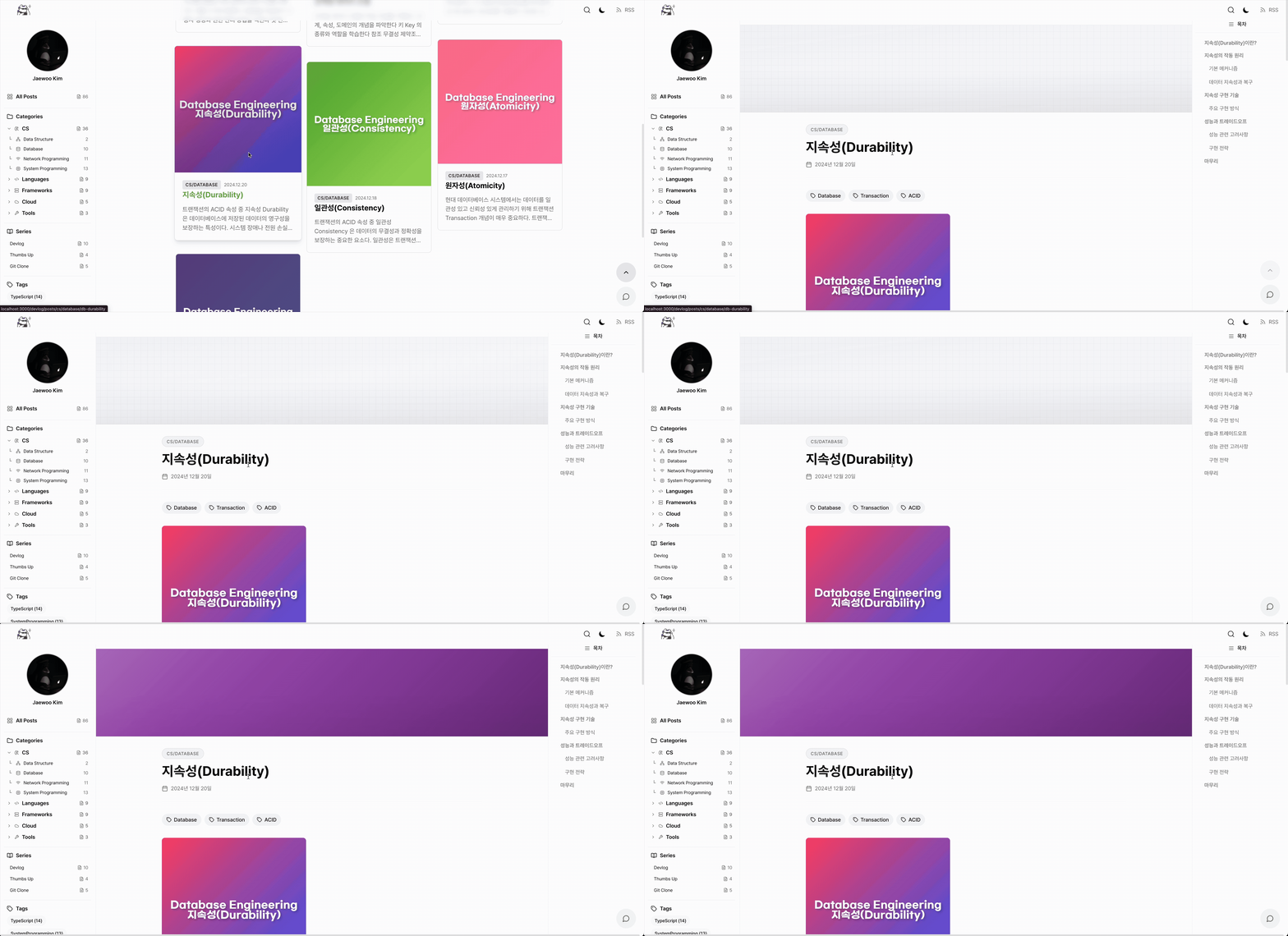
동적 배너 시스템을 적용한 이후, 전체적인 비주얼이 한층 개선되었다. 썸네일과 조화를 이루는 배너가 자연스럽게 렌더링되며, 페이지 로드 시 부드러운 애니메이션도 함께 출력된다. 캐싱 덕분에 리프레시 시 해당 과정이 반복되지 않아 효율적이다. 특히 각 포스트마다 고유한 색상의 배너가 생성되는 점이 개인적으로 가장 만족스럽다.
이 프로젝트의 모든 소스 코드는 GitHub에 공개되어 있습니다. 코드 품질 개선이나 새로운 기능 제안에 대한 피드백은 언제나 환영합니다.