
Git의 핵심 객체들의 구현을 마쳤다. 실제로 이 객체들이 파일시스템에 잘 저장되는지 확인해 볼 필요가 있었다.
먼저 Git 저장소의 기본 구조부터 만들어야 했다. .git 디렉터리를 본떠 .pit 디렉터리를 만들고, 그 안에 필요한 디렉터리를 생성했다.
async function initRepository(repoPath) {
  const gitDir = path.join(repoPath, ".pit");
  await fs.mkdir(path.join(gitDir, "objects"), { recursive: true });
  await fs.mkdir(path.join(gitDir, "refs", "heads"), { recursive: true });
  await fs.writeFile(path.join(gitDir, "HEAD"), "ref: refs/heads/master\n");
}
Git과 동일하게 objects 디렉터리는 Git의 모든 객체들이 저장되는 곳이고, refs/heads는 브랜치 정보를 관리하는 곳이다. 그리고 HEAD 파일은 현재 작업 중인 브랜리를 가리킨다. 전체적으로 Git과 동일하다.
테스트 코드
const { Blob } = require("./objects/blob");
const { Tree } = require("./objects/tree");
const { Commit } = require("./objects/commit");
const fs = require("fs").promises;
const path = require("path");

async function initRepository(repoPath) {
  const gitDir = path.join(repoPath, ".pit");
  await fs.mkdir(path.join(gitDir, "objects"), { recursive: true });
  await fs.mkdir(path.join(gitDir, "refs", "heads"), { recursive: true });
  await fs.writeFile(path.join(gitDir, "HEAD"), "ref: refs/heads/master\n");
}

async function createAndSaveObjects() {
  const repoPath = "./test-repo";
  await initRepository(repoPath);

  const fileContent = "It's Pit!";
  const blob = new Blob(fileContent);
  await blob.save(repoPath);
  console.log("Blob hash:", blob.hash);

  const tree = new Tree();
  tree.addEntry("test.txt", blob.hash);
  const treeHash = await tree.save(repoPath);
  console.log("Tree hash:", treeHash);

  const commit = new Commit(treeHash, "Initial commit");
  const commitHash = await commit.save(repoPath);
  console.log("Commit hash:", commitHash);

  const masterRef = path.join(repoPath, ".pit", "refs", "heads", "master");
  await fs.writeFile(masterRef, commitHash + "\n");
}

createAndSaveObjects().catch(console.error);
test-repo 디랙터리 하위에 .pit가 생기고 그 하위에 objects 등의 디렉터리가 생기게 했다.
test-repo/.pit/objects/
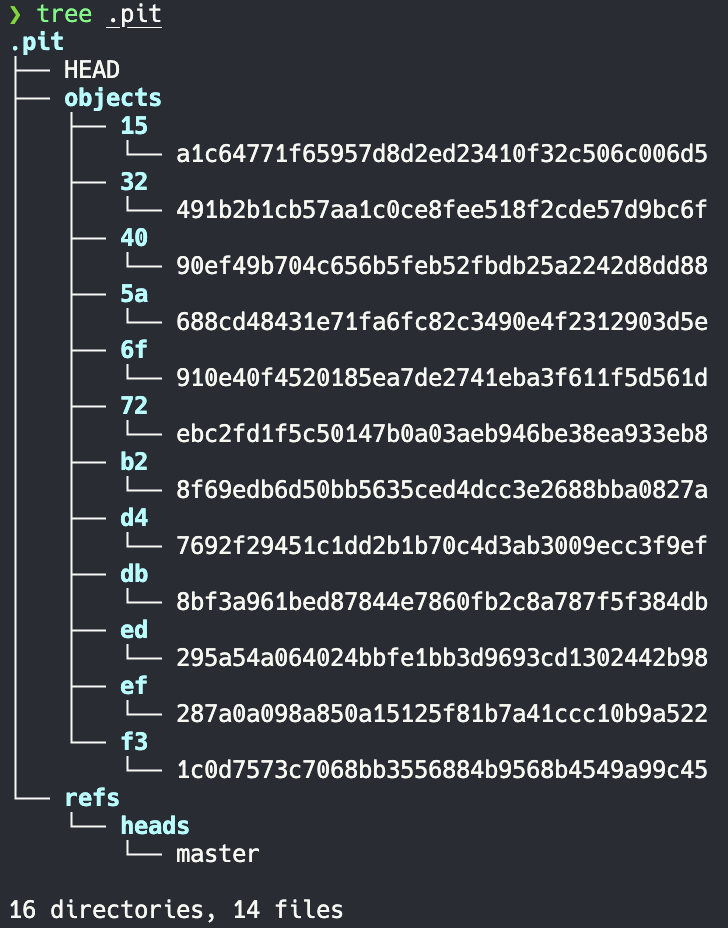
결론적으로, 잘 저장되는 모습을 볼 수 있었다. 해시값의 앞 2글자가 디렉터리명으로, 나머지 값이 파일명으로 들어가 저장된 모습이다.
테스트 코드에서는 간단한 텍스트 파일 "It's Pit!"을 Blob으로 만들고, 이를 Tree에 추가한 뒤, 최종적으로 Commit으로 감싸는 과정을 구현했다.
nodemon으로 실행했는데, 저장을 몇 번 누르다보니 Commit 객체 때문에 파일 개수가 많아졌다..
같은 내용의 파일이 같은 해시값을 가졌고, 타임스탬프가 Commit 객체에 포함되어 있어 Commit의 시점을 추적할 수 있었다.
이번 테스트로 주요 Git 객체들이 구현되어 잘 저장되고 동작함을 확인할 수 있었다.
+) 추가
실제 GIt은 객체들을 저장할 때 zlib 압축을 사용하여 저장한다. 현재 구현에서는 이 부분이 빠져있다.
이 프로젝트의 모든 소스 코드는 GitHub에 공개되어 있습니다. 코드 품질 개선이나 새로운 기능 제안에 대한 피드백은 언제나 환영합니다.