
프로세스 기본 개념
프로세스란?
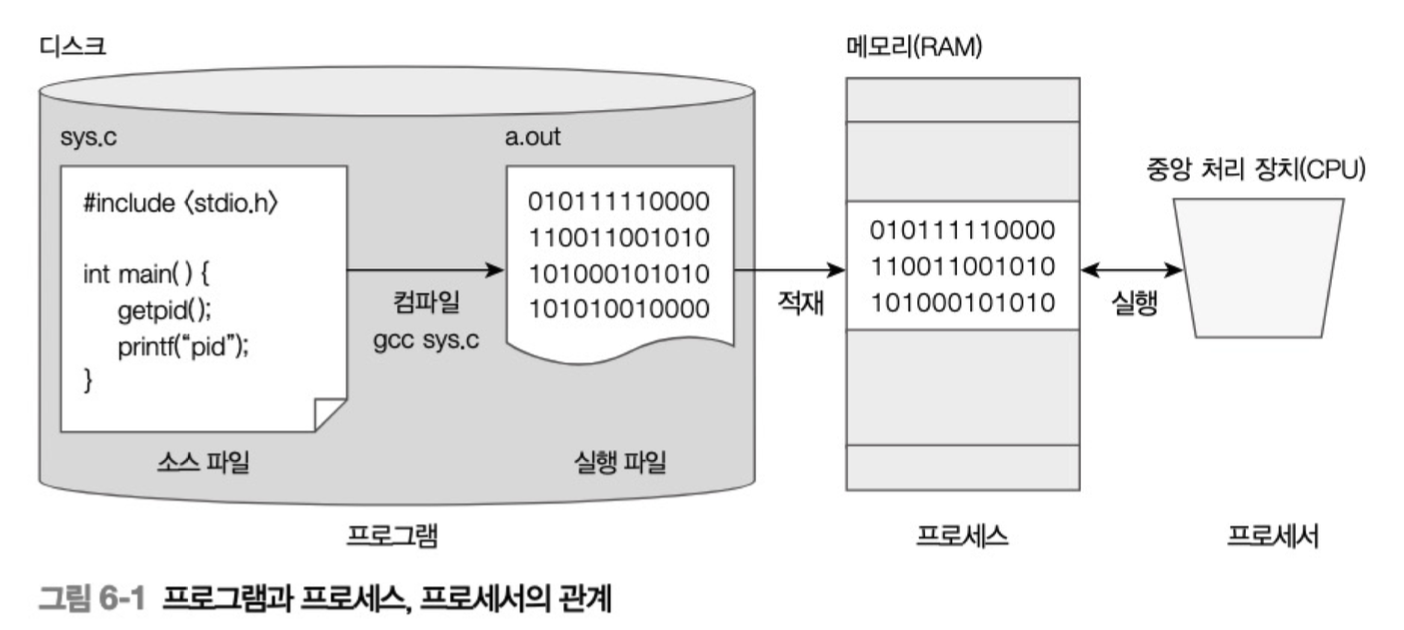
프로세스(Process)는 현재 실행 중인 프로그램을 의미한다.
디스크에 저장된 정적인 프로그램 파일이 메모리에 로드되어 실행되면서 동적인 상태가 된 것이 바로 프로세스다.
프로그램 (디스크) → 메모리 적재 → 프로세스 (실행 중)
주요 개념들
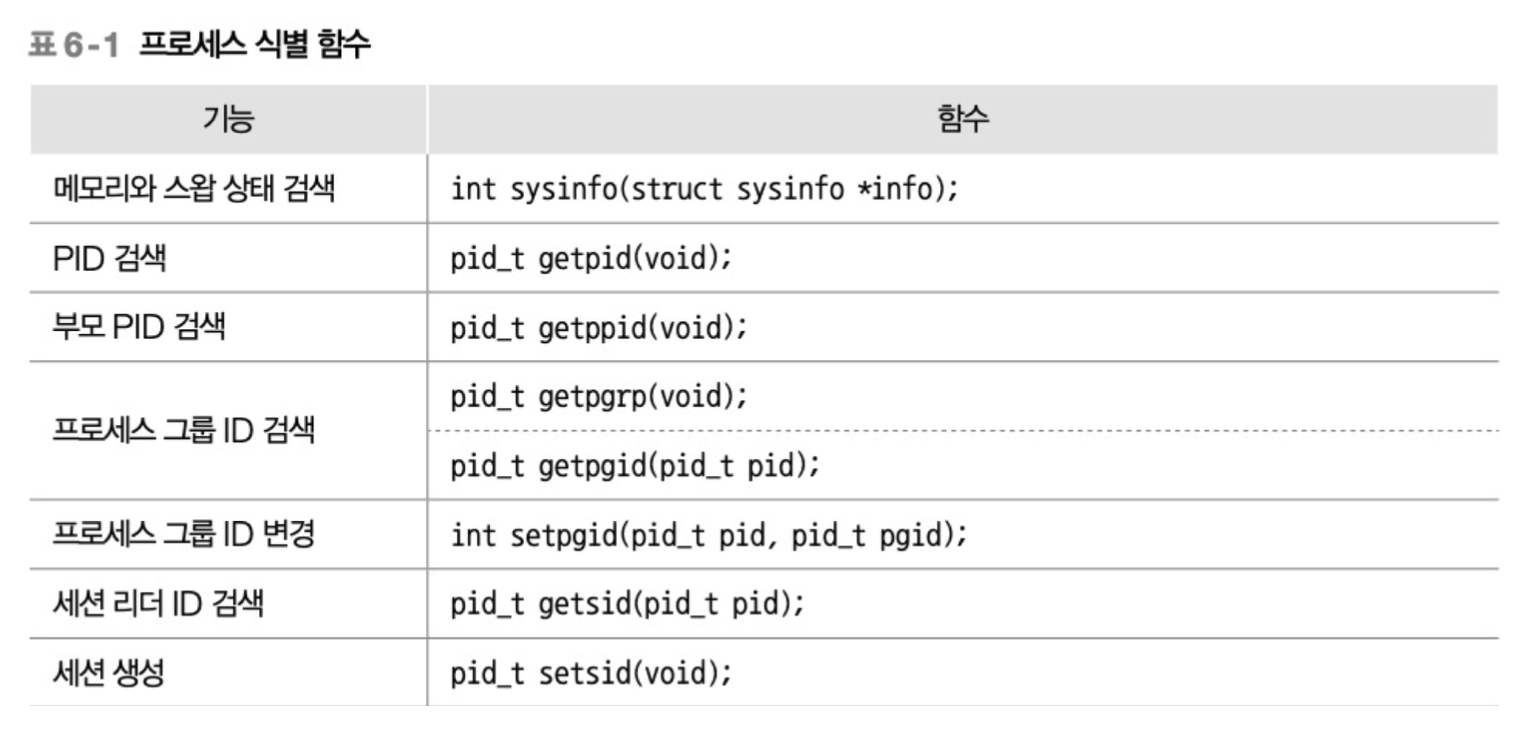
- PID(process id): 시스템에서 프로세스를 식별하는 고유 번호
- PPID(parent process id): 부모 프로세스의 PID
- 프로세스 그룹: 관련된 프로세스들의 집합
- 세션: 터미널 단위로 묶인 프로세스 그룹들
Segmentation Fault와 Core Dump
Segmentation Fault는 프로세스가 접근해서는 안 되는 메모리 영역에 접근했을 때 OS가 발생시키는 오류다.
이때 Core Dump라는 덤프 파일이 생성되어 프로세스가 죽을 때의 메모리 상태를 저장한다.
프로세스 메모리 구조
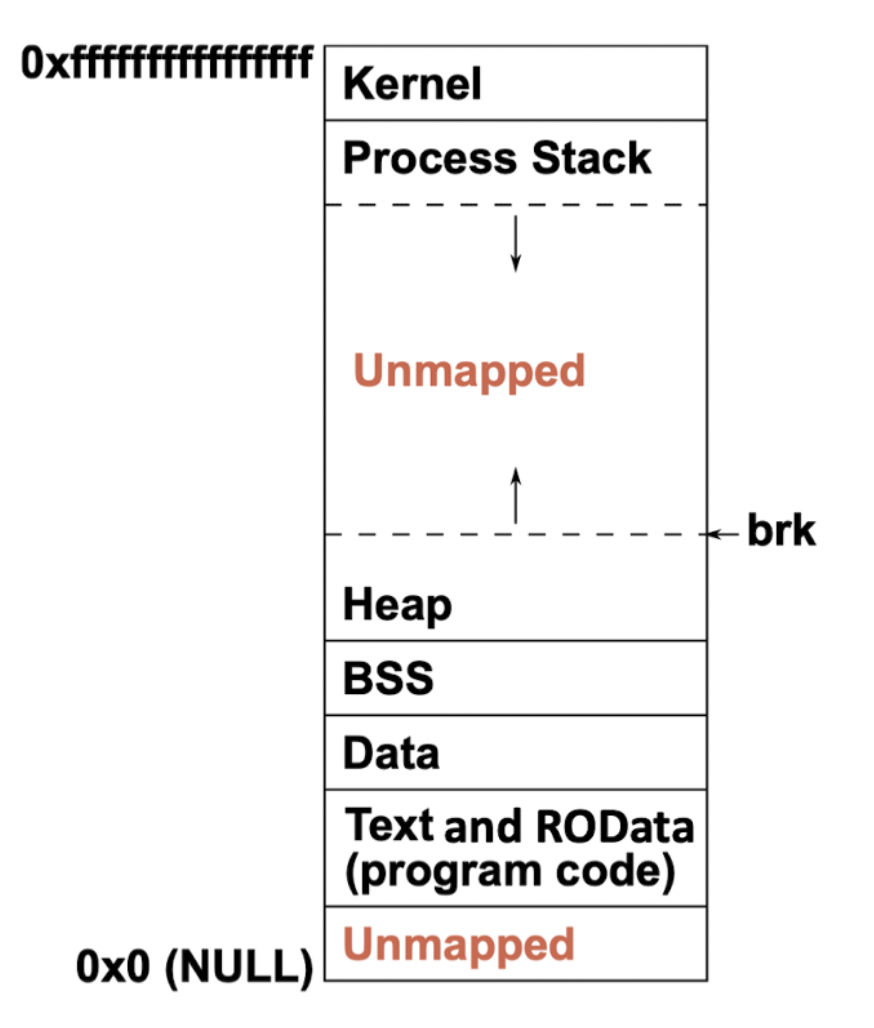
프로세스는 메모리를 여러 세그먼트로 나누어 사용한다.
메모리 세그먼트 구조
| 세그먼트 | 내용 | 특징 |
|---|---|---|
| Text | 실행 코드 (기계어) | 읽기 전용, 실행 가능 |
| ROData | 문자열 리터럴, 상수 | 읽기 전용 |
| Data | 초기화된 전역/정적 변수 | 읽기/쓰기 가능 |
| BSS | 초기화되지 않은 전역/정적 변수 | 0으로 자동 초기화 |
| Heap | 동적 할당 메모리 | malloc, new로 할당 |
| Stack | 지역 변수, 함수 인자 | 함수 호출 시 할당/해제 |
메모리 할당 예시
// Text 세그먼트
int main() {
    // Data 세그먼트
    static int initialized = 10;

    // BSS 세그먼트
    static int uninitialized;

    // Stack 세그먼트
    int local_var = 5;

    // Heap 세그먼트
    int *ptr = malloc(sizeof(int));

    return 0;
}
프로세스 상태와 라이프사이클
프로세스 상태 다이어그램
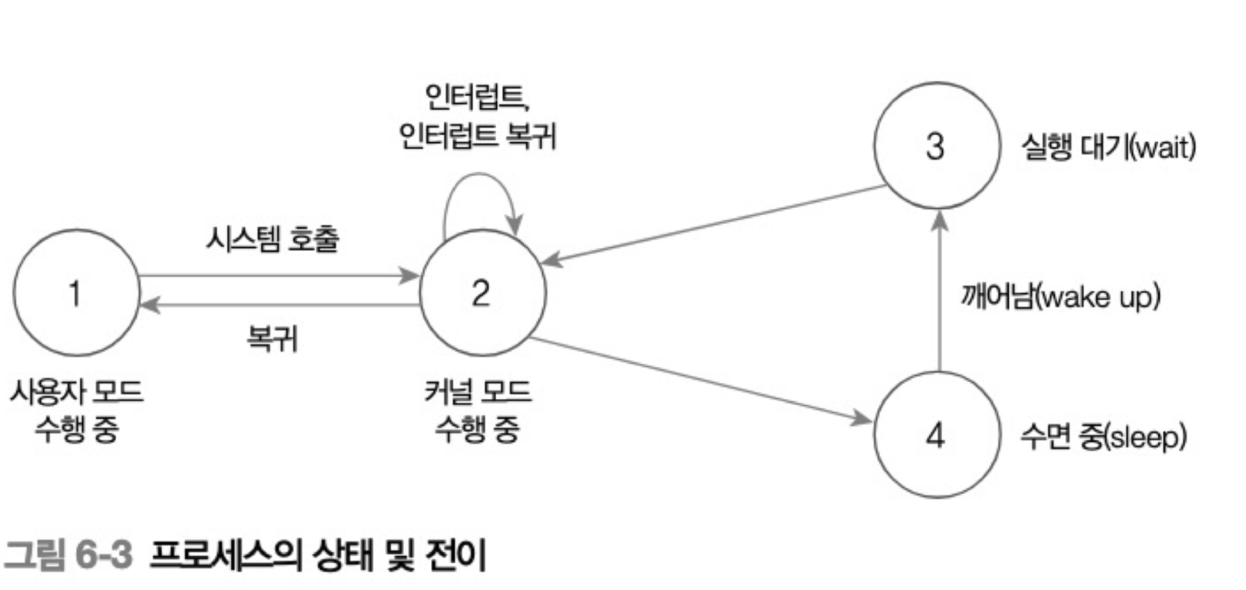
- 실행 파일 로그 → 프로세스 생성 (sleep 상태)
- 사용자/커널 모드에서 실행
- I/O 대기 시 수면 상태로 전환
- 작업 완료 시 준비 상태로 전환
실행 시간 측정
프로세스의 실행 시간은 두 가지로 구분된다.
- 시스템 실행 시간 → 커널 모드에서 커널 코드 수행 시간
- 사용자 실행 시간 → 사용자 모드에서 프로세스 실행 시간
프로세스 생성 및 관리
프로세스 식별
예시
#include <stdio.h>
#include <unistd.h>

int main() {
    printf("PID: %d\n", getpid());
    printf("PPID: %d\n", getppid());
    return 0;
}
프로세스 생성 - system()
system()은 쉘 명령을 받아 새로운 프로세스로 실행한다.
#include <stdlib.h>

int system(const char *command);
특징:
- 명령을 쉘에 전달하여 실행
- 명령 실행이 끝날 때까지 대기
- 종료 상태를 리턴
예시:
int ret = system("ps -ef | grep sshd > sshd.txt");
printf("Return Value: %d\n", ret);
프로세스 생성 - fork()
fork()는 현재 프로세스를 복제하여 새로운 프로세스를 생성한다.
특징:
- 부모 프로세스: 자식 PID 리턴
- 자식 프로세스: 0 리턴
- 실패 시: -1 리턴
예시:
#include <sys/types.h>
#include <unistd.h>
#include <stdio.h>

int main() {
    pid_t pid;

    switch(pid = fork()) {
        case -1: // fork 실패
            perror("fork");
            exit(1);
            break;

        case 0: // 자식 프로세스
            printf("Child Process - PID: %d, PPID: %d\n",
                   getpid(), getppid());
            break;

        default: // 부모 프로세스
            printf("Parent Process - PID: %d, Child PID: %d\n",
                   getpid(), pid);
            break;
    }

    printf("End of fork\n");
    return 0;
}
프로세스 종료
exit() 함수:
void exit(int status);
void _exit(int status);
종료 시 수행 작업:
atexit()함수로 예약한 함수들 실행- 표준 입출력 스트림 정리
- 임시 파일 삭제
_exit()호출하여 자원 반납
예시:
#include <stdlib.h>
#include <stdio.h>

void cleanup() {
    printf("Cleanup function called\n");
}

int main() {
    atexit(cleanup);
    printf("Main function\n");
    exit(0);
}
프로세스 실행 - exec 함수군
exec 함수들은 현재 프로세스의 메모리를 새로운 프로그램으로 교체한다.
주요 함수들:
| 함수 | 설명 |
|---|---|
execl() |
리스트 형태 인자 전달 |
execv() |
배열 형태 인자 전달 |
execlp() |
PATH 환경변수에서 검색 |
execle() |
환경변수 명시적 지정 |
예시:
#include <unistd.h>
#include <stdio.h>

int main() {
    printf("Before exec function\n");

    if (execlp("ls", "ls", "-l", (char *)NULL) == -1) {
        perror("execlp");
        exit(1);
    }

    printf("After exec function\n"); // 실행되지 않음
    return 0;
}
프로세스 동기화
좀비 프로세스와 고아 프로세스
좀비 프로세스:
- 자식이 종료했지만 부모가
wait()으로 정리하지 않은 상태 - PID 테이블 엔트리를 계속 점유
고아 프로세스:
- 부모가 먼저 종료하여 init 프로세스가 입양한 상태
wait() 함수
#include <sys/wait.h>

pid_t wait(int *status);
pid_t waitpid(pid_t pid, int *status, int options);
예시:
#include <sys/types.h>
#include <sys/wait.h>
#include <unistd.h>
#include <stdio.h>

int main() {
    pid_t pid;
    int status;

    if ((pid = fork()) == 0) {
        printf("Child Process\n");
        exit(2);
    } else {
        wait(&status);
        printf("Child exited with status: %d\n", status >> 8);
    }

    return 0;
}
waitpid() 옵션
| 옵션 | 설명 |
|---|---|
WCONTINUED |
수행 중인 자식 프로세스 상태 리턴 |
WNOHANG |
블로킹하지 않고 즉시 리턴 |
WUNTRACED |
실행 중단된 자식 프로세스 상태 리턴 |
환경 변수와 실행 환경
환경 변수 관리
주요 함수들:
#include <stdlib.h>

char *getenv(const char *name);
int setenv(const char *name, const char *value, int overwrite);
int unsetenv(const char *name);
int putenv(char *string);
예시:
#include <stdio.h>
#include <stdlib.h>

int main() {
    char *shell = getenv("SHELL");
    if (shell != NULL) {
        printf("SHELL = %s\n", shell);
    }

    setenv("MYVAR", "Hello World", 1);
    printf("MYVAR = %s\n", getenv("MYVAR"));

    return 0;
}
현재 작업 디렉터리
#include <unistd.h>

int chdir(const char *path);
char *getcwd(char *buf, size_t size);
파일 디스크립터
기본 파일 디스크립터:
- 0: stdin (표준 입력)
- 1: stdout (표준 출력)
- 2: stderr (표준 에러)